

Front-End Developer Course in Ahmedabad

Front End Developer Course in Ahmedabad. Become an Expert Web Developer and get Jobs at MNC

4.5 (1038)
View Reviews
4.7 (312)
View Reviews

Certificate Partner(s): NSDC/Skill India

Certificate Partner Logo
  • Hands on Training
  • Flexible Timings
  • Industry Based Training
  • Expert Trainer
  • Affordable Fees
  • Placement Opportunities

Attend a Free Demo

Fill the details and we will call you for further guidance

Front-End Developer Course in Ahmedabad Icon

Our Facts and Figures

1 Lac+

Student Placed

3000+

Companies TieUp

19+

Offices in India

50+

Industry Courses

Get 100% Job Assistance by enrolling in Certified Front-End Developer Course

Job Assistance
3000+ Companies Tie-Ups

Enter Your Details Now

Key Highlights

Limited Students Batch
Personalised Attention
Highly Qualified Teachers
Flexible Batch Timings
Interactive Learning
Live Projects
Career Support
Job Oriented Training

Front End Developer Course Highlights

Front End Development Course in Ahmedabad — 100% Placement Assistance + Live Projects

TOPS Technologies offers the most comprehensive Front End Development Course in Ahmedabad designed to help students build real-world projects while gaining practical skills. With 100% Placement Assistance and hands-on training, this course is ideal for anyone wanting to start a successful IT career in Ahmedabad. Learn more about the city on Wikipedia.

TOPS Technologies has 4 training centers in Ahmedabad — CG Road, SG Road, Nikol, and Maninagar — making access easy for students across the city.

  • 100% Placement Assistance
  • Live project training with industry exposure
  • Flexible batches for students and working professionals
  • Expert front end developers as trainers
  • Certification support and interview preparation
  • Career guidance, resume building & mock interviews

Why Choose a Front End Development Course in Ahmedabad?

Ahmedabad is one of India's fastest-growing IT hubs, with hundreds of companies hiring skilled front end developers for web and app development roles. Our Front End Development Course in Ahmedabad helps learners gain a competitive edge by offering practical skills aligned with modern industry needs. From mastering frameworks to understanding UI/UX fundamentals, this course covers everything required to excel. Many recruiters in the city look for job-ready candidates trained on live projects, making this course a perfect match.

Job Opportunities in Ahmedabad

A skilled front end developer can explore job opportunities across software companies, startups, digital agencies, e-commerce firms, and IT consultancies in Ahmedabad. Salaries typically start at ₹2.5 LPA for beginners and can go beyond ₹7 LPA with experience and advanced skills. With strong demand for front end development, job seekers can secure roles faster—especially with 100% Placement Assistance from TOPS Technologies.

Job Designations After Completing This Course

  • Front End Developer
  • Web Designer
  • UI Developer
  • HTML/CSS Developer
  • JavaScript Developer
  • React Developer
  • UI/UX Associate
  • Web UI Specialist
  • Front End Engineer
  • Front End Trainee Developer

Who Can Enroll?

  • Freshers and students
  • Graduates from any stream
  • Working professionals switching careers
  • Designers wanting to upgrade to coding
  • Anyone interested in web development

What to Expect From This Training

Students receive training with real-time project development exposure. The program includes certification, tools training, code reviews, 100% Placement Assistance, resume building sessions, mock interviews, and participation in CareerFest events like JobFest and CareerFest / Campus Drive. Our Placement Cell helps students secure interviews across top companies.

Curriculum Overview

  • Module 1: HTML5 & CSS3 — Learn structure building, responsive design, and modern styling techniques.
  • Module 2: JavaScript Fundamentals — Master core programming principles, DOM manipulation, events, and ES6 features.
  • Module 3: Bootstrap Framework — Build responsive, mobile-friendly interfaces using grids, components, and UI elements.
  • Module 4: Advanced JavaScript & APIs — Work with real-time data using fetch, JSON, and API integration.
  • Module 5: React Basics — Understand components, props, hooks, routing, and building single-page applications.
  • Module 6: Project Development — Create a complete portfolio-ready project with mentor support.

Placement & Career Support

TOPS Technologies provides extensive placement assistance through dedicated HR teams and tie-ups with 3000+ IT companies. Students get resume writing help, interview preparation, mock interviews, and opportunities to participate in JobFest, Campus Drive, and other hiring events. Our Placement Cell works continuously to arrange interviews and ensure students achieve their career goals.

Testimonials

  • "This front end developer course helped me build confidence with hands-on training and project work." — uses keyword: front end developer course
  • "I found the trainers very knowledgeable, and the front end developer courses here are industry-oriented." — uses keyword: front end developer courses
  • "Learning a front end developer course in Ahmedabad at TOPS transformed my career completely." — uses keyword: front end developer course in ahmedabad
  • "The institute provides excellent front end development course with placement support." — uses keyword: front end development course with placement

Local Centers — Train at the nearest TOPS Technologies centre

TOPS Technologies CG Road

Address: TOPS House, 2, Chimanlal Girdharlal Rd, Shanti Sadan Society, Ellisbridge, Ahmedabad, Gujarat 380006

Phone: +919974755006

TOPS Technologies SG Road

Address: 102, Baleshwar Square, Iskcon Cross Rd, Sarkhej - Gandhinagar Hwy, opposite Iskcon Mandir, Ahmedabad, Gujarat 380015

Phone: +919904422211

TOPS Technologies Maninagar

Address: 401, Amruta Arcade, Maninagar Char Rasta, Lala Lajpat Rai Marg, Maninagar, Ahmedabad, Gujarat 380008

Phone: +919974863333

TOPS Technologies Nikol

Address: 401, TOPS Technologies, Hilltown Landmark, Nikol Canal Rd, Opp. Das Khaman, Nikol, Ahmedabad, Gujarat 380049

Phone: +917624007666

Other Local Insights

Students in Ahmedabad prefer practical training, flexible batches, and placement-focused courses. Front end development remains one of the most in-demand IT skills, and TOPS Technologies continues to be a preferred choice due to expert instructors, real-world projects, and strong industry partnerships.

Begin your journey in front end development and build a strong career in Ahmedabad with expert-led training, live projects, and 100% Placement Assistance at TOPS Technologies.


Advanced Course Insights

Front end development is one of the core pillars of modern digital experiences. Every business—from e-commerce brands to tech startups—needs interactive, responsive, and visually appealing interfaces, creating massive demand for skilled front end developers. Our Front End Development Course in Ahmedabad prepares students not only for today’s job market but also for future trends in UI/UX, JavaScript frameworks, and advanced interactive web design.

Globally, front end developers are in high demand due to rapid digital transformation. Whether it’s building progressive web apps, integrating APIs, or enhancing user experiences, front end development offers unparalleled career growth. In India, the job market continues to expand, with roles paying between ₹3 LPA to ₹10 LPA depending on skills, frameworks, and experience.

Students who enjoy creativity, problem-solving, and technology will find front end development a rewarding career choice. With structured curriculum, expert mentoring, hands-on projects, and 100% Placement Assistance, TOPS Technologies ensures each learner becomes industry-ready. Whether you are a fresher or a working professional, mastering front end skills can open doors to global opportunities and long-term career success.

See More

40%

Average Salary Hike

4.5 Lacs

Highest Salary

3000+

Hiring Partners

Join Our Free Upcoming Webinar

Front End Developer Course Curriculum

Download Curriculum

  • Student Intro , Career Center Login ,What is Internet, HTTP/HTTPS, WWW, Domain name and Top Domain name
  • SEO, What is HTML, What is Text Editor, Web Browser, Downloading Text Editor , HTML Structure, First Program in HTML
  • 1) HTML Introduction 2) HTML Getting Started 3) HTML Elements 4) HTML Attributes 5) HTML Basic Tags
  • 1) HTML Doctypes 2) HTML Layout 3) HTML Head 4) HTML Meta 5) HTML Scripts
  • Practical Examples: 1) Create any simple web page to display your 2) Importance of meta tag and Doctypes
  • Tags and self Closing Tags, Basic Tag , Attribute and Events, Marquee Tag
  • HTML – Meta Tags, HTML – Comments, HTML – Images, HTML – Tables, HTML – Lists, HTML – Text Links, HTML – Image Links
  • HTML Headings HTML Paragraphs HTML Links HTML Text Formatting HTML Styles HTML Images
  • HTML – Frames, HTML – Iframes, HTML – Blocks, HTML – Backgrounds, HTML – Colors, HTML
  • Anchor Tag, Img Tag, Image Mapping
  • HTML – Fonts, HTML – Forms, HTML – Embed Multimedia ,HTML – Marquees, HTML – Header, HTML – Style Sheet, HTML – Javascript ,HTML – Layouts
  • List Tag, Tables, Forms
  • HTML – Tags Reference, HTML – Attributes Reference, HTML – Events Reference, HTML – Fonts Reference, HTML – ASCII Codes, ASCII Table, Lookup, HTML – Color Names, HTML – Entities, HTML – Fonts, Ref HTML – Events, Ref MIME Media Types, HTML – URL Encoding L
  • Practical Examples: 1) Create simple Doc and display your name using different heading tag 2) Create link for open 3) Create document using all text formatting tags
  • HTML online editor
  • HTML Tables HTML Lists HTML Forms HTML Iframes
  • Practical Examples: 1) Create simple table 2) Create time table for your school 3) Create table with colspanrowspan example 4) Create invoice using table 5) Create hotel 6) Create index page for your book. 7) Create list with different categories.
  • Practical Examples: Create registration form with all fields and validation

  • 1) CSS 2) In-line CSS Internal Style External Style Sheet @import Style Sheet 3) CSS Class CSS ID
  • What is CSS How to Implement CSS Class and ID Width and Height Css Unit Box Model (Margin,padding,Border) and create basic template design
  • Practical example : Create page with difference color text
  • CSS Selectors , Pseudo Classes and Elements , Float and Clear and Alignment , Font Styling , Opacity and Visibility , Line Height
  • 1) CSS Text 2)CSS Font 3) CSS Background 4) CSS Links 5) CSS Lists 6) CSS Display 7) CSS Visibility
  • Creating Header of Website , Outline , Background , Counter increment , Counter reset ,Cursor and Overflow
  • Position , Creating Submenu , Border Radius, Transform , Animation , Font Awesome Icons
  • 1) CSS Layout Model 2) CSS Border 3) CSS Margin 4) CSS Padding 5) CSS Outline
  • Font Family Through Google Font , import fontface rule ,FlexBox
  • 1) CSS Float 2) CSS Align 3) CSS Position 4) CSS Element Size 5) CSS Layer
  • Practical Example : Create image gallery
  • 1) CSS Pseudo Class Selector 2) CSS Pseudo Element Selector
  • CSS Properties 1) Background, 2) border 3) bottom 4) caption-side 5) clear 6) clip 7) color 8) content
  • Practical Example: Create Menu with logo at left side and contact info at right side using clear effect
  • 1) counter-increment 2) counter-reset 3) cursor 4) direction 5) display 6) empty-cells
  • Practical Example: 1) Create submenu list using counter
  • 1) float 2) font 3) height 4) left 5) letter-spacing 6) line [height, style, style-7) image, style-position, 8) style-type] 9) margin 10) outline 11) overflow 12) padding
  • 1) page-break 2) position 3) quotes 4) right 5) table-layout 6) text 7) top 8) vertical-align 9) visibility 10) white-space 11) width 12) word-spacing 13) z-index
  • Practical Example: wireframe layout for your template using div
  • Media Query (For Responsive Website) , Creating a Responsive Website
  • Validate a Website, Hosting a website with free domain name, Column , Clippath , Gradient Color , Filter, Border Image

  • HTML5 Tags, HTML5 Input and Attribute
  • Audio and Video, Semantic Element in HTML5
  • Canvas, Svg and Display Grid

  • 1) JS Introduction 2) JS Getting Started 3) JS Syntax 4) JS Variables 5) JS Generating Output 6) JS Data Types 7) JS Operators 8) JS Events 9) JS Strings 10) JS Numbers 11) JS If, Else 12) JS Switch Case
  • What is Javascript, Creating First Javascript Program, Way to apply Javascript , Event in Javascript , How to select Tag Classes and Id
  • Practical Example: 1) Create program for input color and output that code 2) Create program for pattern using loop
  • Functions, Alert ,Confirm , Prompt , Addition of Two Number , Hide and Show Password
  • a) JS Arrays b) JS Sorting Arrays c) JS Loops d) JS Functions e) JS Objects
  • How to apply CSS using Javascript, Image Changing
  • Practical Example: 1) Create function Finding the Maximum and Minimum Value in an Array 2) Create pyramid pattern program
  • If Else Statement, Javascript Form Validation
  • JAVASCRIPT & DOM 1) JS DOM Nodes 2) JS DOM Selectors 3) JS DOM Styling 4) JS DOM Get Set Attributes 5) JS DOM Manipulation 6) JS DOM Navigation
  • How to see Trafic in Our Website
  • Practical Examples: 1) Get input data and perform different operations 2) Make dynamic CSS by click
  • JAVASCRIPT ADVANCED 1) JS Date and Time 2) JS Math Operations 3) JS Type Conversions 4) JS Event Listener 5) JS Regular Expressions 6) JS Error Handling
  • Practical Example: Create custom Validation

  • jQuery Basic a) jQuery Introduction b) jQuery Getting Started c) jQuery Syntax d) jQuery Selectors e) jQuery Events
  • What is JQuery , Downloading JQuery File , First Program in JQuery
  • Practical Example: Change CSS
  • JQuery Syntax , Query Selector, Hide , Slide , Fade Effect in JQuery
  • JQuery Effects 1) jQuery Show/Hide 2) jQuery Fade 3) jQuery Slide 4) jQuery Animation 5) jQuery Stop 6) jQuery Chaining 7) jQuery Callback
  • How to Apply CSS Using JQuery, How to Add Class and Remove Class in Jquery , JQuery Animation
  • Practical Example: Create slider with animation
  • Filter using JQuery , JQuery Slider Plugin , Validation Plugin
  • JQuery Advanced 1) jQuery Traversing 2) jQuery Ancestors 3) jQuery Descendants 4) jQuery Siblings 5) jQuery Filtering 6) jQuery Load 7) jQuery No-Conflict
  • Zoom Plugin, Now Make Your Existing Website Dynamic with Javascript and JQuery

  • Bootstrap Basic 1) Bootstrap Introduction 2) Bootstrap Getting Started 3) Bootstrap Grid System 4) Bootstrap Fixed Layout 5) Bootstrap Fluid Layout 6) Bootstrap Responsive Layout
  • Practical Example: Create Navigation Menu
  • 1) Bootstrap Typography 2) Bootstrap Tables 3) Bootstrap Lists 4) Bootstrap List Groups 5) Bootstrap Forms 6) Bootstrap Custom Forms 7) Bootstrap Input Groups 8) Bootstrap Buttons 9) Bootstrap Button Groups
  • Practical Example: Create login registration form
  • 1) Bootstrap Images 2) Bootstrap Cards 3) Bootstrap Media Objects 4) Bootstrap Icons 5) Bootstrap Navs 6) Bootstrap Navbar 7) Bootstrap Breadcrumbs 8) Bootstrap Pagination 9) Bootstrap Badges 10) Bootstrap Progress Bars 11) Bootstrap Spinners 12) Bootstra
  • Practical Example: 1) Create image gallery 2) Create model for login Product list page with pagination
  • Bootstrap Advanced 1) Bootstrap Modals 2) Bootstrap Dropdowns 3) Bootstrap Tabs 4) Bootstrap Tooltips 5) Bootstrap Popovers 6) Bootstrap Alerts 7) Bootstrap Stateful Buttons 8) Bootstrap Accordion 9) Bootstrap Carousel 10) Bootstrap Typeahead 11) Bootstra
  • Practical Example: Create your project website using bootstrap

  • Introduction to JavaScript,Code editors,Developer console
  • Fundamentals,Hello, world!,Code structure,The modern mode, “use strict”,Variables,Data types
  • Interaction: alert, prompt, confirm,Type Conversions,Basic operators, maths,Comparisons,Conditional branching: if, ‘?’
  • Logical operators,Nullish coalescing operator ‘??’,Loops: while and for,The “switch” statement, Functions, Code Quality,Debugging in Chrome,Coding Style,Comments

  • Data types,Methods of primitives,Numbers,Strings,Arrays,Array methods,Iterables,Map and Set,WeakMap and WeakSet
  • keys, values, entries,Destructuring assignment,Date and time,JSON methods, toJSON
  • Objects: the basics,Objects,Object references and copying,Garbage collection,Object methods, “this”
  • Constructor, operator “new”,Optional chaining ‘?.’,Symbol type, Object to primitive conversion

  • Document,Browser environment, specs,DOM tree,Walking the DOM,Searching: getElement*, querySelector*
  • Node properties: type, tag and contents,Attributes and properties,Modifying the document,Styles and classes
  • Introduction to Events, Introduction to browser events,Bubbling and capturing,Event delegation,Browser default actions, Dispatching custom events
  • UI Events,Mouse events,Moving the mouse: mouseover/out, mouseenter/leave,Drag’n’Drop with mouse events, Pointer events, Keyboard: keydown and keyup,Scrolling
  • Forms, controls,Form properties and methods,Focusing: focus/blur,Events: change, input, cut, copy, paste,Forms: event and method submit

  • Network requests,Fetch, Form Data,Fetch: Download progress,Fetch: Abort,Fetch: Cross-Origin Requests,Fetch API
  • URL objects,XMLHttpRequest,Resumable file upload,Long polling, WebSocket,Server Sent Events

  • Basic JavaScript – Understanding var, let and Const – JS switch, if, else, – JS loop – Javascript JSON
  • Functions – Function Declaration in JS – Arrow Functions – Higher Order Functions – Map, Reduce and Filter
  • Classes – Javascript Classes and Objects – Class Properties and Methods – This keyword and binding in JS – Class inheritance – Exports and Imports
  • Array in JS – Creating Array – Array methods – The Spread & Rest operators – Destructuring
  • JS Async – Callbacks – Promises – Async/Await
  • ES6 Basics and Babel
  • Understanding the DOM
  • Small Project using ES6

  • Installation – Add React to a HTML Website – Create New React App – Hello World
  • Getting started in React
  • JSX
  • Components
  • Component Composition
  • JSX – Why JSX? – Embedding Expressions in JSX – Attributes with JSX – Children with JSX
  • Props & Prop Types
  • Event Handlers
  • State
  • React Web App
  • Components, State, Props – Function Component – Class Component – Props – State – Class Component Lifecycle

  • Conditional Rendering – Lists and Keys – Forms – Handling Events – Lifting State up
  • Hooks – Introduction – Using the State hook – Using the Effect hook – Rules of Hook – Custom Hook

  • Creating the first App
  • Understanding the App
  • Styling the App
  • Inspecting & Debugging styles
  • Built-in components
  • Working with Images
  • ListViews
  • TextInput
  • Styling React Components – CSS stylesheet – Inline Styling – CSS Modules – CSS in JS Libraries (styled components)
  • Creating Views (Scenes)
  • Conditional Rendering – Lists and Keys – Forms – Handling Events – Lifting State up
  • Hooks – Introduction – Using the State hook – Using the Effect hook – Rules of Hook – Custom Hook
  • Advance Concepts – Context, useContext() – Working with Refs and useRefs() – Fragments – Performance optimization with useMemo() – Styling React Components – CSS stylesheet – Inline Styling – CSS Modules – CSS in JS Libraries (styled components)
  • Bootstrap with React
  • React Router – Browser – Router – Link – Route – Template integration – Http Request in React – Get and Post data

  • React Router
  • Browser - Router - Link - Route
  • Template in tegration – Http Request in React – Get and Post data

  • State
  • State storage problem
  • Redux Basics
  • Redux Principles
  • Implementing Redux
  • React-Redux
  • Middleware
  • Counter App Demo
  • Redux – Complexity of Managing state – Understand the Redux Flow – Setting up Reducer and store – Dispatching Actions – Passing and Retrieving Data with Action – Combining Multiple Reducers – Adding Middleware – Redux Dev tools

Attend a Free Demo

Fill the details and we will call you for further guidance

Front-End Developer Course in Ahmedabad Icon

Course Key Features

  • Complete Front End Web Development Course
  • Program Websites with JavaScript
  • Learn the most popular Web Development Frameworks
Key Feature Icon

Skills Covered

  • HTML
  • CSS
  • Javascript
  • Jquery
  • Bootstrap
  • Advance Javascript
  • Reactjs
Skills Icon

Job Roles

  • Front End Developer
  • UI Developer
  • Web Developer
Tools Icon

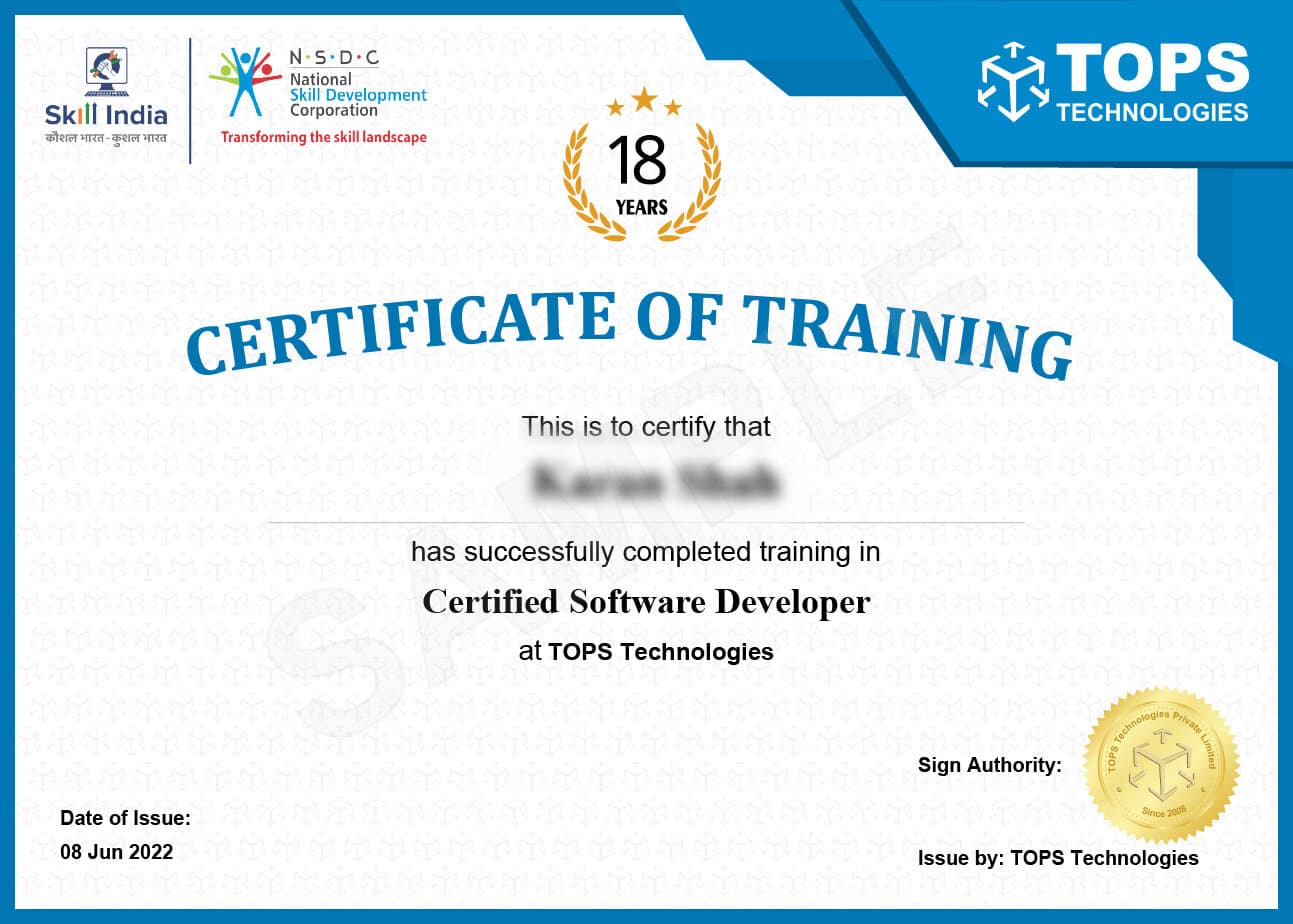
Get Training Certificate by Government
Recognized NSDC/Skill India

Certificate Demo Image
  • National Skill Development Corporation
  • Supported by the vision of PM Shri Narendra Modi
  • Certification by NSDC SkillIndia
  • Valid for all Jobs and College Training
  • International Recognition
Certificate Demo Image

Student Reviews

FAQ

The Front-End Developer Course Fees in Ahmedabad may vary greatly depending on the course's duration and the academic institution that is offering the course. There is a possibility that the price will be somewhere between a few thousand to a few lakhs.

If you're interested in Front-End Web Development, visit our website or speak to our experts regarding our Front-End Training in Ahmedabad.

Yes, TOPS Technologies offers Front-End Web Development Live Project Training in Ahmedabad. This Front-End Development Training is designed for students who want to learn how to build websites from scratch. The Front-End Classes in Ahmedabad cover all the basics of web development, including HTML, CSS, and JavaScript. After completing the course, students can build a fully functioning website using these technologies. 

There are many ways to get a job in this field after you complete our Front-End Web Developer Classes at TOPS Technologies:

Find a job posting online and apply for it. This is the most common way. Another way is to get to know people who work in the field and ask them for suggestions.

Looking at online job boards is the best way to find a job in Ahmedabad after doing Front-End Web Development. Many websites list jobs in Ahmedabad. Look for "front-end web developer" or "web designer" positions. Once you have a few good leads, send in your applications, and make sure to include a strong portfolio of your work.

If you can't find a job online, you could also try networking with people who work in the same field. Go to meetups or events in your area and talk to as many people as possible. Ask them if they know of any jobs that are open or if they have any suggestions. Your chances of getting hired will increase if you get to know people in the industry.

No matter what you do to find a Front-End Web Development job in Ahmedabad, be sure to put your best foot forward and show off your skills and talents.

If you are looking for a Front-End Web Development Course with placement assistance in Ahmedabad, then TOPS Technologies is the best Front-End Developer Institute. We offer comprehensive training on all aspects of Front-End Web Development, from HTML and CSS to JavaScript and jQuery. 

Our experienced instructors will guide you through each step of the course, ensuring that you have the skills and knowledge necessary to succeed in your chosen career. Once you have completed our Front-End Web Development Course, we will provide placement assistance to help you find a job in Ahmedabad. 

We have strong relationships with many local and international companies, so we can connect you with the right opportunity. With our placement assistance, you can be confident that you will find a job that meets your skills and interests.

Recent research and estimates indicate that the annual compensation of a Front-End Web Developer in Ahmedabad may go up to a maximum of 8 lakhs of Indian Rupees (INR). However, the compensation scale may vary depending on the experience and skills of the candidate. If you want to increase your chances of landing a high-paying web development job, then you need to enroll in a reputed Front-End Web Development Institute in Ahmedabad and get certified in web development. 

If you are a fresher and looking for a job in Ahmedabad in Front-End Web Development, then TOPS Technologies can help you prepare for your interviews. We offer interview preparation courses for freshers that cover all aspects of Front-End Web Development. 

Our interview preparation course for freshers covers all the important topics you need to know for your interviews. We will teach you how to answer questions confidently, how to present yourself professionally, and how to make a good impression on your interviewer. We also provide mock interviews so you can practice your interviewing skills before your interview. 

Our mock interviews are conducted by experienced professionals who will give you constructive feedback so that you can improve your performance. If you are serious about landing a job in Front-End Web Development, enroll in Front-End Institute in Ahmedabad today!

To become a Front-End Web developer, one must possess several skills. These skills can be learn easily if you enroll in a Front-End Web Development Institute in Ahmedabad and complete their web development certification. Here are the most important skills you need: 

Firstly, they must have a strong understanding of HTML, CSS, and JavaScript. They must be able to code websites from scratch, using only these three languages. 

Secondly, they must have excellent communication skills. This is because they will often work closely with clients or other development team members to create the best possible user experience for a website or application. 

Thirdly, Front-End developers must be able to think creatively and solve problems. This is because their job involves developing innovative solutions to problems that may arise during the development process. 

Finally, they must have good time management skills and be able to work to deadlines. This is essential to ensure that projects are completed on time and within budget.


No prior experience is needed. The course starts from the ground up, teaching fundamental concepts and building your skills step-by-step to make learning smooth and manageable.


Typically, the course takes about 3 to 6 months to complete. The exact duration depends on your learning speed, class schedule, and whether you’re attending part-time or full-time.


You’ll need a reliable computer, a stable internet connection, a code editor like Visual Studio Code, and a modern browser such as Google Chrome or Mozilla Firefox for testing your projects.

Latest Blogs